 |
The SKIRT project
advanced radiative transfer for astrophysics
|
|
The SKIRT project
advanced radiative transfer for astrophysics
|
The SKIRT source code is contained in an online repository and can be obtained as described in the Installation Guide. The files are organized in a nested directory hierarchy; your local copy may look as follows:
~/SKIRT
    debug
    git
        Docs
        MakeUp
        SKIRT
        SMILE
    release
        ...
        MakeUp
        SKIRT
        ...
    resources
        ...
        SKIRT9_Resources_Core
    run
The git directory contains an identical copy of the online SKIRT repository; it is usually placed inside a local directory called SKIRT in your home directory. The debug and release directories contain the result of building the SKIRT code, including the executables. Always use the release build for "production" simulations; the code in the debug build is not optimized and runs several times slower. The resources directory contains resource files required by SKIRT and downloaded from the SKIRT web site. The run directory may contain input/output files involved in actually running SKIRT. The information in these last four directories is not part of the source code repository, which is why these directories are not inside the git directory.
Immediately inside the git directory reside the main project file CMakeLists.txt and some shell scripts used for building SKIRT or its documentation. For more information, see the Installation Guide and Generating the SKIRT project documentation.
The highest-level git subdirectories (MakeUp, SKIRT, SMILE) each represent a subproject of the SKIRT project. In their turn, they have nested subdirectories organizing the source code and related support files into modules.
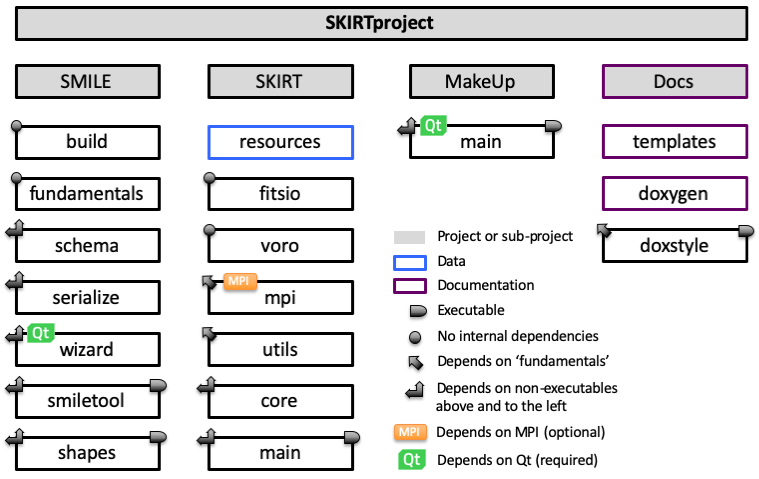
The above diagram lists the various subprojects and modules in the SKIRT code. Boxes with a gray background depict a subproject; the other boxes depict a module. A colored border indicates that the module contains supporting data files rather than source code. Most module boxes represent a static library that can be used by other modules; those with a symbol in the upper right corner represent an executable program. Refer to the diagram legend for further details.
Modules depend on each other in a strict hierarchy; there are no two-way or circular dependencies. For a complete overview of which modules depend on which, see Dependencies between modules.
These are the subprojects of the SKIRT code:
SMILE – contains the code for generic, fundamental facilities, including those for handling XML-based parameter files; see The SMILE metadata subproject.SKIRT – contains the code for the SKIRT command line program, performing radiative transfer simulations; see SKIRT Q&A and command line options.MakeUp – contains the code for the MakeUp tool that provides a graphical user interface for configuring SKIRT; see MakeUp, the graphical interface for SKIRT parameter files.Docs – contains data files and a helper tool that support writing and building the reference documentation for the SKIRT code; see Generating the SKIRT project documentation.Below is a brief description of the modules in each of these subproject, listed in order of appearance in the above diagram.
SMILE subproject (also see The SMILE metadata subproject):
build – This small library allows retrieving versioning information about the current build. It cooperates with the build system to provide information such as the time when the current executable was built.fundamentals – This library offers generic functionality that is used by other modules throughout the project, including platform-independent system interaction, basic string handling, and low-level XML processing.schema – This library contains the meat of the SMILE functionality, including facilities for processing SMILE schemas, representing SMILE datasets in memory, and performing introspection on C++ classes in SMILE client code.serialize – This library uses the capabilities of the schema module to serialize and deserialize SMILE data sets, and to resurrect a client's C++ object hierarchy from a SMILE dataset.wizard – This library implements the graphical wizard that allows creating or editing a SMILE dataset, given the corresponding SMILE schema file.smiletool – This command-line tool can work with SMILE datasets corresponding to a given SMILE schema file. The tool can conduct a text-based question and answer session to create a dataset, produce a LaTeX description for an existing dataset, and more.shapes – This command-line program serves as an example of the typical SMILE library use case (similar to but a lot less complex than SKIRT).SKIRT subproject (also see SKIRT Q&A and command line options):
resources – This module includes information on which resource data files are required by the various classes throughout the SKIRT source tree.fitsio – This library provides input/output capabilities for FITS files. It contains a subset of the cfitsio source files available from NASA's HEASARC software site. For more information see The CFITSIO third-party library.voro – This library provides support for building Voronoi tessellations. The source code is adapted from the Voro++ library written by Chris H. Rycroft (University of California, Berkeley / Lawrence Berkeley Laboratory). For more information see The Voro++ third-party library.tetgen – This library provides support for building Delaunay tetrahedralizations. The source code is adapted from the TetGen library written by Hang Si (WIAS Berlin).mpi – This library encapsulates any and all invocations of the Message Passing Interface (MPI), providing a working implementation if MPI support is requested and available, or a stub representing a single process if not. Concentrating all MPI calls in a single module allows the code in other modules to be compiled without the MPI extra's.utils – This library provides basic SKIRT-specific utility classes and interfaces that do not depend on any SKIRT code outside this library itself.tools – This library provides the SimulationItem class itself, together with tool classes that do depend on it: configuration, logging, random numbers, unit systems, cosmology, the parallel execution engine, and file path handling and stored-table, text, and FITS file I/O.field – This library implements the VectorField class hierarchy representing velocity or magnetic vector fields that can be attached to sources and media.grain – This library implements the optical and calorimetric properties of dust grain materials (GrainComposition), dust grain size distributions (GrainSizeDistribution), and the GrainPopulation class that combines these into an ingredient for a multi-grain dust mix.sed – This library implements spectral energy distributions (the SED class) and parameterized SED libraries (SEDFamily) from which an SED can be obtained through interpolation.geometry – This library implements three-dimensional density distributions (the Geometry class and its decorators), SPH smoothing kernels, and readers for imported N-body/hydrodynamical simulation snapshots (the Snapshot hierarchy) on which some geometries are built.wavelength – This library implements wavelength grids (WavelengthGrid), wavelength-weighting distributions (WavelengthDistribution), and photometric bands (Band).source – This library implements primary emitting sources (the Source class), their angular emission patterns (AngularDistribution) and polarization profiles, and the luminosity normalizations used to scale them. Secondary (dust/line re-emission) sources are handled separately, as part of the medium module.material – This library implements the MaterialMix class hierarchy representing the optical and other physical properties of dust, electron, and gas material mixtures, the MaterialMixFamily class, and the shared medium-state types (MaterialState, StateVariable, MediumState) and calculation helpers used only by these classes.medium – This library implements MediumSystem and the Medium class hierarchy representing the transfer media in a simulation, including the spatial cell library classes, the SpatialGrid hierarchy with its tree-node and tree-policy helpers, the one-dimensional Mesh hierarchy, the SecondarySourceSystem and secondary (dust/line re-emission) source classes, and related material normalization and dynamic state recipe classes.instrument – This library implements InstrumentSystem and the Instrument class hierarchy representing the virtual detectors that record a simulation's output, including the all-sky projection helpers used by AllSkyInstrument and HEALPixSkyInstrument, the TimeGrid hierarchy used by TimeInstrument and FluxRecorder, and FluxRecorder itself.probe – This library implements the Probe and Form class hierarchies, together with ProbeFormBridge, used to extract and output additional information about a simulation while it is running.simulation – This module builds the skirt command-line executable, consisting of the entry point (SkirtMain, SkirtCommandLineHandler) together with the top-level simulation orchestration classes (Simulation, MonteCarloSimulation, ConfigurationSetup) and the SimulationItem registry (also see The ins and outs of simulation items) that only this executable needs. It handles the command line arguments and links in everything else from the other libraries.MakeUp subproject (also see MakeUp, the graphical interface for SKIRT parameter files):
main – This desktop program displays a graphical user interface for editing parameter files. The code in this module essentially invokes the functionality provided by the wizard module in the SMILE project.Docs subproject (also see Generating the SKIRT project documentation):
templates – This module includes some developer support data files, such as the license template to be included in every source file.doxygen – This module includes some data files to support the generation of reference documentation from the project source code through the Doxygen utility.doxstyle – This console application can be invoked from the Qt Creator code editor to help streamline Doxygen documentation blocks, as explained in Formatting the source code. The code in this module depends only on the fundamentals module in the SMILE subproject; it is included here so that it would be easily available to any SKIRT developer.